AI agents,
forged for you.
Autonomous by default. Conversational by nature.
Forge generates the harness around any LLM — agents that do the work, send emails, post updates, modify code, run pipelines, on their own. Before any irreversible or high-stakes move, they check in with you. Like a senior operator who knows when to ask.
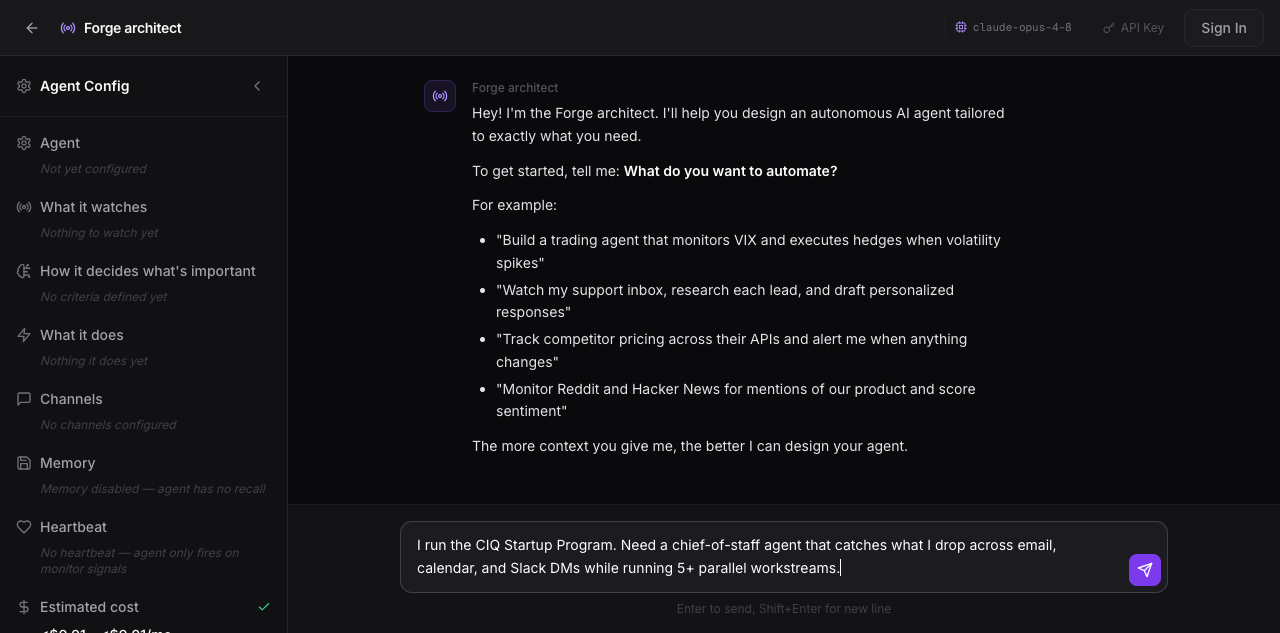
myagentos.ai/create — real product, real chat
Live recreation of Phase 1.5 capture
For founders, operators, and engineers who'd rather own the agent than rent one.
Not another chatbot wrapper.
Three things separate a Forge agent from everything else you've tried.
Phase 1.5 Context Interview
The architect captures 27 fields across 5 waves before generating code. Who you are, how you decide, what makes you throw your laptop. The agent ships pre-loaded with you.
32 capabilities, all runnable
Every capability ships real code, not a stub. Six categories — core, execution, communication, data, integration, observability — wired by default. Drop your credentials in .env, the agent uses them.
Every byte in your zip
The runtime is vendored — your agent has no upstream dependency on us. Run it locally, on your container, or air-gapped.
5 waves capture your context before forging the agent.
Every Forge agent starts with a 27-field structured interview. Your voice, anti-patterns, role, communication style, and standing rules all become the agent's actual config — not generic defaults.
Identity
(5)- ✓Name
- ✓Role
- ✓Company
- ✓Background
- ✓Domain expertise
Context
(5)- ✓Timezone
- ✓Working hours
- ✓Channels
- ✓Tools you use
- ✓Current workflow
Objective
(5)- ✓Pain points
- ✓Success criteria
- ✓What to watch
- ✓What to draft
- ✓Quiet hours
Voice
(6)- ✓Tone
- ✓Length preference
- ✓Banned phrases
- ✓Decision style
- ✓Anti-patterns
Standing Rules
(6)- ✓Drafts vs sends
- ✓Per-action approval
- ✓Boundaries
- ✓Daily heartbeat
- ✓Memory protocol
27 structured fields → One agent shaped like you. Day-one in your voice. Knows your role. Enforces your rules.
Your context becomes your agent's bootloader.
Phase 1.5 answers flow directly into your workspace files. The agent reads these every time it boots — no fine-tuning, no embeddings, no opaque inference. Just markdown the agent and you can both edit.
USER.mdwho you are, in your wordsSOUL.mdvoice, archetype, anti-patternsSTANDING_ORDERS.mdhard rules and escalation triggersIDENTITY.mdname, emoji, catchphrasesAGENTS.mdoperational manual the agent reads
# USER.md

## Identity

- Name: Dan
- Role: Run an early-stage program. Serial founder.
  Runs multiple workstreams in parallel — sales, AI research,
  internal tooling, advising founders. Context-switches 30+ times/day.
- Timezone: PST. Working hours 8am-7pm.
- Heartbeat: 7:30am daily, 6pm wind-down summary.

## Communication preferences

- Voice: terse
- Decision style: data + opinion. Quantify it, then recommend.
- Response length: 1-3 sentences default. Long only when warranted.

## Sharp domains (skip the basics)

- Startup operations, distribution, agentic AI architecture
- Sales process, founder psychology, LLM economics
- Rocky/RHEL infrastructure, code review (Python/TS/Rust)

## Where the agent fills in

- Calendar archaeology, email triage, meeting prep
- Follow-up tracking, saying-no drafts, end-of-day summaries

## Avoid (immediate distrust)

- "I'd be happy to help" / "Great question!"
- Corporate filler, fake enthusiasm
- Excessive disclaimers, soft-pedaling
- 5 clarifying questions when 1 would do
- Unsolicited emoji, "circle back", "touch base"Bring your own LLM. Anthropic, OpenAI, Gemini, Grok, or any OpenAI-compatible endpoint. Switch by editing one env var.
Adversarial sandbox tests, SSRF guards, env scrubber. Honest about what's hardened and what isn't. Threat model.
Download the source. Run it locally, on your server, or air-gapped. The agent boots even if myagentos.ai disappears.
32 capabilities. Wired by default.
Each one ships real code, tested, ready to call. You opt out of what you don't want — not in to what you do.
- ·Persistent memory
- ·Scheduled commitments
- ·Heartbeat loop
- ·Skills
- ·Standing orders
- ·Sub-agent spawning
- ·Python execution
- ·Shell execution
- ·Flows
- ·Sandbox
- ·Email (IMAP)
- ·Email (SMTP)
- ·Slack
- ·SMS
- ·Webhooks
- ·Gateway (HTTP+WS)
- ·TTS
- ·File ops
- ·HTTP requests
- ·Code modification
- ·Web search
- ·Web extract
- ·SQLite
- ·GitHub
- ·Google Calendar
- ·Notion
- ·Linear
- ·HubSpot
- ·ACP (multi-CLI)
- ·Plugins
- ·Conversation logging
- ·Metric tracking
Full reference in the documentation.
32 capabilities is the floor, not the ceiling.
Your agent ships with general-purpose tools — call any HTTP API, run any Python code, execute any shell command, receive any webhook. Three ways to extend, no PR to Forge required.
Just ask
Tell the agent the API docs and which env var holds your token. It uses web_extract or python_exec directly. No code, no config.
Standing orders
Add a section to STANDING_ORDERS.md describing the API. The agent reaches for it reflexively, across sessions, like a native capability.
When asked about MRR: GET /v1/balance
Auth: bearer STRIPE_API_KEY
Plugins
Drop a Python file in plugins/with a@register_tooldecorator. First-class status: TOOLS.md, typed errors, full schema.
def stripe_balance(args, ctx):
return requests.get(...)
Every integration in the world is one conversation away. How extensibility works.
Built for the work that doesn't fit a SaaS box.
The agent already knows your domain. The capabilities are already there. You build what nobody else can sell you.
Chief of staff
- →Catches what you drop across email, Slack, calendar
- →Drafts replies — never sends without your nod
- →Pre-loads meeting briefs 15 min before each call
- →End-of-day "what slipped" + morning heartbeat
Inbox triage
- →Reads every inbound email, scores urgency
- →Tracks who is waiting on you and for how long
- →Auto-drafts polite-no replies for invites
- →Surfaces forgotten threads on Sunday evening
Calendar archaeologist
- →"What did I commit to 3 weeks ago that I forgot?"
- →Cross-references DMs against calendar events
- →Flags conflicts and double-bookings
- →Knows context for every meeting before it starts
Trading & monitoring
- →Watches price feeds, technical indicators, news
- →Runs your strategy with your risk rules in standing orders
- →Surfaces setups that match your historical wins
- →Never executes without explicit confirmation
Lead intelligence
- →Monitors Slack, CRM, email for inbound leads
- →Sub-agents run founder + company dossiers
- →Scores against your ICP, your win patterns
- →Drafts personalized outreach with talking points
Compliance watch
- →Tails logs, monitors APIs, reads security feeds
- →Cross-references against your policy in STANDING_ORDERS
- →Spawns sub-agents to investigate anomalies
- →Daily audit log + weekly compliance summary
Three ways to run. All sovereign.
Choose how it boots. The agent code, workspace, and vendored runtime are identical — only the deployment shell changes.
Local Python
Fastest to start
Run directly on your machine. Best for development, daily use, dogfooding.
$python3 -m venv .venv && source .venv/bin/activate pip install -e . python -m <agent>
Rocky Linux container
Production-ready
Isolated container. Best for long-running production agents on your infrastructure.
$./container/build.sh ./container/run.sh # Listens on 127.0.0.1:7891 via gateway
Fully sovereign
Air-gapped, no LLM API
Bundles a local LLM (llama.cpp / Ollama) into the image. Zero external dependencies.
$./container/start-sovereign.sh # All inference local # No internet required
Your data never leaves your computer.
Most AI agents send everything to a SaaS backend. Forge sends nothing. Every byte stays on the laptop you installed it on — by design, not by promise.
Cloud-hosted
- ✗Runs on their serversEvery prompt, every response, every action through their backend
- ✗You pay per token + monthly feeMargin on inference, lock-in to their pricing
- ✗Your data trains future modelsOr sits on their disk indefinitely
- ✗Outage = your agent stopsNo backend? No work.
Local-first, BYOK
- ✓Runs on your machinePython process you started. Close the terminal, it's gone.
- ✓You bring your own API keyDirect to Anthropic/OpenAI/Gemini. Forge never sees a dollar.
- ✓Your data stays on your diskMemory, drafts, logs — plain markdown + SQLite. Yours forever.
- ✓Works offline (with Ollama)Air-gappable. No internet, no problem.
If you don't trust Forge, read the source code in your download.
Stop teaching every AI tool who you are.
Forge captures it once, in your words. Then ships you an agent that already knows.
Build your agentFree to design and download. You bring your own LLM key at runtime.
The substance, not the brochure.
Real architecture, real numbers, real trade-offs. Three deeper reads for whoever's interested.
Architecture deep-dive
6+ pages on how Forge generates agents. Phase 1.5 interview, 32-capability catalog, 96-tool surface, sandbox model, self-modification mechanics. With PR citations.
vs LangChain / DIY
Comparison tables. Line counts. PR ledger. Why Forge is a generated harness vs LangChain abstractions you assemble. For people who'd rather not spend 2-3 months on glue code.
What you can build
Sales chief of staff. Investment thesis agent. Personal CTO. Operations brain. Six example agents with the concrete things they actually do for you.
Honest about what we built, honest about what we didn't. Security posture for the audited trust model.